Understanding Gemini Spark: A New Era of AI Automation
Google’s Gemini Spark represents a significant shift in how businesses can deploy AI for routine tasks. Unveiled during the Google I/O 2026 event, this 24/7 autonomous AI agent isn’t just another glorified assistant; it’s designed to work tirelessly, even when your devices are powered down. Gemini Spark stands out with its unique capability to execute complex workflows across multiple Google Workspace applications automatically. This design philosophy enhances productivity by enabling seamless management of various tasks without the constant need for human intervention.
Launch and Capabilities
Launched on May 19, 2026, and hitting the Japanese market by mid-July that same year, Gemini Spark has quickly established itself as Google's go-to solution for automation within organizational frameworks. What’s particularly striking is its departure from traditional Q&A chat interfaces. Instead, it operates under a framework centered around three pivotal functions: Tasks, Skills, and Schedules. These pillars allow Gemini Spark to navigate and execute intricate workflows that go beyond mere question answering.
Gemini Spark’s built-in integrations with Google Workspace empower it to manage tasks within Gmail, Google Drive, Google Docs, and Google Sheets with admirable efficiency. However, the magic truly occurs when it connects with Google Apps Script (GAS). GAS has recently been recognized as a core service within Google Workspace, coming with enhanced data protection and technical support that enterprises demand today. This integration not only extends the control capabilities of Gemini Spark but opens up possibilities for automating complex workflows through various external APIs.
The Power of Integration with Google Apps Script
By leveraging Google Apps Script, Gemini Spark can break free from the limitations imposed by its native tools. The interaction between Gemini Spark and GAS serves as a gateway to administer a wide variety of Google APIs and external services, making it a powerful ally for enterprises looking to scale their automation efforts.
When you set up Gemini Spark with GAS, the returns are exponential. This article aims to provide a roadmap for integrating these two technologies, particularly through the implementation of Model Context Protocol (MCP) servers and Webhook triggers. This integration not only enhances Gemini Spark's existing functionality but also equips it with the means to interact with specialized external APIs, thus broadening its application landscape beyond the confines of Google Workspace.
This isn’t just a technical deep-dive; it highlights a pivotal moment in AI-assisted automation. As enterprises increasingly look for efficiency, the marriage of Gemini Spark and Google Apps Script offers a dynamic duo for pushing the boundaries of what’s possible, promising to redefine operational workflows in the corporate space.
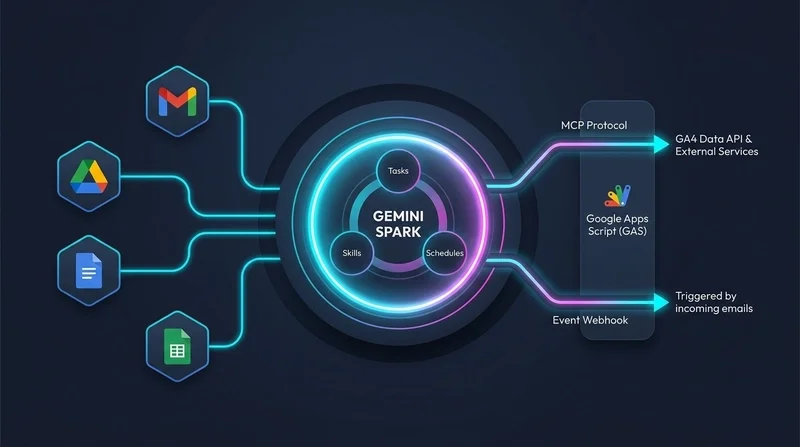
In the architecture diagram above, we see how Gemini Spark operates within an integration ecosystem. The central engine, reliant on its core pillars for functionality, showcases how native Google Workspace tools combine with extended capabilities through Google Apps Script—this dual approach underscores the flexibility and depth Gemini Spark can achieve for users.
Gemini Spark is poised to challenge the status quo in office productivity. If you’re navigating the current landscape of workplace automation, the potential here is more significant than it appears at first glance. The pathway to automation that Gemini Spark paves with Google Apps Script could very well be a decisive factor in how businesses enhance their operational efficiency in the future.
Integrating Google Apps Script with Gemini Spark
Understanding how to effectively connect Google Apps Script (GAS) with Gemini Spark can significantly streamline data workflows. The process begins by setting up the GAS MCP (Managed Code Protection) server, which acts as a bridge for API interactions.
Step-by-Step Deployment
First, you'll need to implement the server script. Grab the main script file, `DeployMcpServer.js`, from the official GitHub repository. This is essential as it contains the logic required for the MCP functionality. Copy its contents into your script file, typically named `Code.gs`.
Next, let's address the Access Key Setting. If you're not configuring any specific parameters through the `PropertiesService`, the script defaults to `accessKey=sample`. Remember, custom configuration can be key for differentiating access permissions, so plan accordingly.
Once that’s set, head to the script editor and begin the deployment process. By selecting "Deploy" > "New deployment," you will choose "Web app" as the deployment type. In this stage, configure it to execute as "Me" and allow access to "Anyone." This open accessibility ensures optimal interaction with external requests, crucial for integrations.
Don’t forget to save the Web App deployment URL. You’ll need it for registration within Gemini Spark, following the format `https://script.google.com/macros/s/{DEPLOYMENT_ID}/exec`.
Connecting the GAS MCP Server to Gemini Spark
Now that the GAS MCP server is active, the next phase is registration within Gemini Spark. Navigate to "Connected Apps" and look for "Custom apps for Spark." Enter the URL you obtained earlier, appending the necessary access key parameter: `https://script.google.com/macros/s/{DEPLOYMENT_ID}/exec?accessKey=sample`.
It's advisable to review the security protocols and confirm the connection. Provide a name for your MCP app—like `GAS-MCP`—and ensure that the tool connection is confirmed. Proper naming conventions can help maintain clarity, especially when managing multiple applications.
Testing the Integration
The real test comes down to functionality. Start by querying Google Analytics 4 (GA4) data through the GAS MCP server. You’ll instruct Gemini Spark to utilize the MCP server for data extraction by crafting a precise prompt. In your request, specify the GA4 Property ID, desired date range, and metrics you wish to retrieve. For instance, requesting a summary of active users by city can yield insights vital for marketing strategies.
Upon running the test, Gemini Spark will notify you to approve the MCP invocation. If successful, it returns structured GA4 analytical insights, providing a synthesized summary right within your chat interface. This ability to seamlessly convert data requests into meaningful insights demonstrates the power of integrating GAS with Gemini Spark.
Technical Advantages
This approach to integrating GAS MCP with Gemini Spark not only simplifies API interactions, but it also effectively allows for high-level analytical processing. By delegating OAuth management and data fetching to the MCP server, Gemini Spark can focus on delivering actionable insights without getting bogged down by low-level API mechanics.
Furthermore, the collaborative efforts of both platforms create a dynamic environment for data handling—turning complex data extraction processes into straightforward conversational prompts. This is where the integration truly shines, making it a valuable asset for any data-driven team looking to optimize their operations.
Final Thoughts
As we've unraveled the intricate workings of Google Gemini Spark and its synergy with Google Apps Script, it’s evident that we're looking at a pivotal moment in automation technology. The capabilities of Gemini Spark aren't just impressive; they signal a significant leap forward in the realm of AI-driven efficiency. It’s noteworthy how seamlessly this system can execute complex workflows without the need for cumbersome external frameworks or services.
However, this isn't without its challenges. Limitations on POST requests and URL encoding issues can be a point of friction, especially for developers looking to leverage the full potential of HTTP-based communication. The trade-offs between direct GET requests and the more robust Model Context Protocol (MCP) highlight a nuanced landscape; while the former offers simplicity, it falls short for heavier data lifting tasks. This raises a critical question: how will enterprise users adapt to these constraints while striving for efficiency?
The advantages of combining Google Apps Script's power with a 24/7 autonomous agent like Gemini Spark are undeniable. Yet, reliance on the MCP pattern suggests that early adopters will need to adopt new workflows to maximize the benefits. For those working in this space, understanding these integrations will be paramount. The potential for transformative automation across Google Cloud services—and beyond—offers a promising horizon.
Ultimately, while we stand at the cusp of unprecedented automation capabilities, it's important to approach these tools with a critical eye. With the right configuration and strategic implementation, leveraging Gemini Spark could indeed redefine operational workflows for enterprises, establishing a new standard for what AI assistance can achieve. The next steps will be crucial—how organizations adapt and innovate with these technologies could set the stage for their future success.