Streamlining Antigravity Agent Skills: Configurability Without Duplication
Antigravity Agent Skills offer an exceptional way to impart a specific workflow to your AI agent, allowing for swift implementation across various projects. You simply create a brief SKILL.md file and place it in a designated folder, where the agent readily accesses it whenever required. However, there's a notable drawback: these skills are rigidly static. If you download a skill crafted by someone else and you wish for a slight tweak in functionality, the only option is to duplicate and modify the entire file manually. This has unfortunately led to a proliferation of skill forks that become increasingly cumbersome to manage over time.
In this guide, I’ll share how to implement a small convention that enables any Agent Skill to read from a per-project configuration file. This means you can adopt a skill and effortlessly customize its behavior just by editing a few lines in a YAML file, eliminating the need for direct modifications to the skill itself.
What You Will Build
You will create a minimal, reusable layer called Configurable Agent Skills. This setup consists of three main parts:
A Python script named
resolve_config.py, which merges the default settings of a skill with project-specific configurations and displays the final result.A standard convention whereby every skill includes two files: a
config.default.yamlfile for the skill’s configuration options and theSKILL.mdfile that describes its functionalities.A project-specific configuration file located at
.agent/skills.config.yaml, allowing users to customize the skill according to their own preferences.
By the end of this process, you’ll have a functional git-commit-formatter skill that can adapt its behavior based on how different teams want to run it— be it in Conventional Commits mode or gitmoji mode—using the exact same skill files, sans forking.
Prerequisites
To effectively follow this tutorial, ensure that you have the following:
Google Antigravity installed (via the IDE, CLI, or SDK - any works since skills are merely files).
Python 3 installed along with the PyYAML library. Install PyYAML using
python -m pip install pyyaml.A basic familiarity with terminal commands and YAML syntax is beneficial but not critical.
New to writing Agent Skills? The next two sections will get you up to speed.
Defining Antigravity Agent Skills
An Agent Skill in Antigravity refers to a directory that houses a SKILL.md file and may optionally include scripts, templates, or examples. The SKILL.md file starts with a YAML block (frontmatter) that outlines its name and description, followed by straightforward Markdown instructions.
The agent loads skills on an as-needed basis, initially retrieving only the brief description of each skill. Upon matching a request, it accesses the complete instructions to carry out the desired action, ensuring a focused operation.
Here’s a basic example of a skill set up for enforcing Conventional Commits:
---
name: git-commit-formatter
description: Formats git commit messages according to the Conventional Commits specification. Invoked when a user commits changes or writes a commit message.
---
# Git Commit Formatter
When drafting a commit message, adhere to the Conventional Commits format:
`type(scope): description`
Available types: feat, fix, docs, style, refactor, perf, test, chore.
Once you place this in your skills directory and request the agent to "commit these changes," it will generate a well-formatted message. Quite pragmatic, isn’t it?
Shortcomings of Static Skills
Examine the skill closely; the allowed types (feat, fix, docs, etc.) are hardcoded into the instructions. This may work well until specific variations are required. For instance, if your team adopts a ci type or favors emojis in commits, adjustments are needed.
With the static approach, changing any detail necessitates copying the entire skill and updating the Markdown, which leads to an avalanche of private forks. Subsequently, when an enhancement is made to the original version, those forks miss out. Instead of skills being a shared resource, they morph into independent rewrites.
The primary issue stems from an unclear division between shared skill logic— which should be universally accessible— and the customizable settings unique to each project. The question arises: how can we rectify this?
Introducing the Configurable Skills Solution
The concept is straightforward: rather than embedding settings within the instructions, skills will instead:
Distribute settings and their defaults in a dedicated
config.default.yamlfile.Read a consolidated configuration (encompassing defaults as well as any project-specific adjustments) prior to execution.
For project-level adjustments, a file named .agent/skills.config.yaml exists at the root of the user's project:
# .agent/skills.config.yaml
# (this file is edited within your project instead of modifying the skill globally)
git-commit-formatter:
style: gitmoji
extra_types: [ci, build]
scope_required: true
This process allows you to drop in the skill, configure a few keys, and move on without altering the skill files themselves.
To implement this, a script is necessary to read both files, combine their contents, and deliver the result to the agent. Let’s build it.
Building the Config Loader
Start by creating a file titled resolve_config.py. This script’s responsibility is to take the skill's name, load the corresponding config.default.yaml, find the project's .agent/skills.config.yaml, and merge the two files while prioritizing user-specific values.
Begin with a deep-merge function, which forms the backbone of the loader:
def deep_merge(base, override):
"""Recursively merge override onto base.
Dictionaries merge key by key; other data types (scalars, lists) are replaced entirely by the override value.
"""
if isinstance(base, dict) and isinstance(override, dict):
    merged = dict(base)
    for key, value in override.items():
        merged[key] = deep_merge(merged[key], value) if key in merged else value
    return merged
return override
It’s intentional here: while dictionaries merge by key, lists replace existing values comprehensively, ensuring predictable behavior. If you need to manage "defaults alongside extras," implement an explicit extra_types key.
Your next step involves locating the project-specific configuration. The loader traverses from the current directory until finding the .agent/skills.config.yaml file:
from pathlib import Path
def find_project_config(start: Path):
"""Walks upward from the start looking for .agent/skills.config.yaml."""
start = start.resolve()
for folder in [start, *start.parents]:
    candidate = folder / ".agent" / "skills.config.yaml"
    if candidate.is_file():
        return candidate
return None
Integrate the various components: your loader identifies the skill’s default configuration, loads the user’s overrides, merges them, and then presents the final output:
import sys, yaml
from pathlib import Path
def resolve(skill_name, skill_dir, project_root):
    defaults = yaml.safe_load((Path(skill_dir) / "config.default.yaml").read_text()) or {}
    user_path = find_project_config(Path(project_root))
    user_all = yaml.safe_load(user_path.read_text()) if user_path else {}
    user_cfg = (user_all or {}).get(skill_name, {}) or {}
    return deep_merge(defaults, user_cfg)
That wraps up the core concept. The complete code in the example repository adds a command-line interface, JSON output, and detailed error messages, but the essential logic is captured above.
Converting a Skill into a Configurable One
Now, let’s transition your static commit skill into a configurable variant. This transformation requires two files.
Firstly, you need to create config.default.yaml alongside the skill. This file outlines every setting along with a safe default to ensure functionality even if the user hasn’t provided a configuration:
# Default configuration for the git-commit-formatter skill.
style: conventional # conventional | gitmoji
types: # fundamental allowed commit types
- feat
- fix
- docs
- style
- refactor
- perf
- test
- chore
extra_types: [] # additional types are merged with the base `types`
scope_required: false # if true, a scope is mandated: type(scope): ...
max_subject_length: 72 # maximum subject line length limit
Secondly, modify the SKILL.md to initiate configuration resolution first and foremost. This crucial step instructs the agent to first read the settings prior to executing any commands:
---
name: git-commit-formatter
description: Formats git commit messages according to a team’s preferred convention (Conventional Commits or gitmoji). Activated when the user commits changes or writes a commit message. Reads from per-project settings allowing teams to customize without altering this skill.
---
# Git Commit Formatter (Configurable)
## Step 1 - Resolve configuration (this step is always performed first)
Run the loader and read its output:
`python scripts/resolve_config.py git-commit-formatter --project-root .`
Apply the resulting settings:
- `style`: `conventional` or `gitmoji`.
- `types` + `extra_types`: the complete roster of allowed commit types.
- `scope_required`: if true, a scope becomes obligatory.
- `max_subject_length`: imposed limit on the subject line.
## Step 2 - Compose the message
Select the primary type from `types` + `extra_types`, build the subject according to the chosen `style`, and enforce `scope_required` and `max_subject_length`.
This pattern—making the agent execute a script and respect its output—mirrors the functionality of Antigravity's own validation skills. It ensures predictable outcomes rather than relying on the model's memory.
Note how the extra_types element addresses the add-on list dilemma. The default list remains intact while user-specified types are added to it, eradicating the necessity for forking in order to incorporate types like ci.
Implementing Project-Specific Overrides
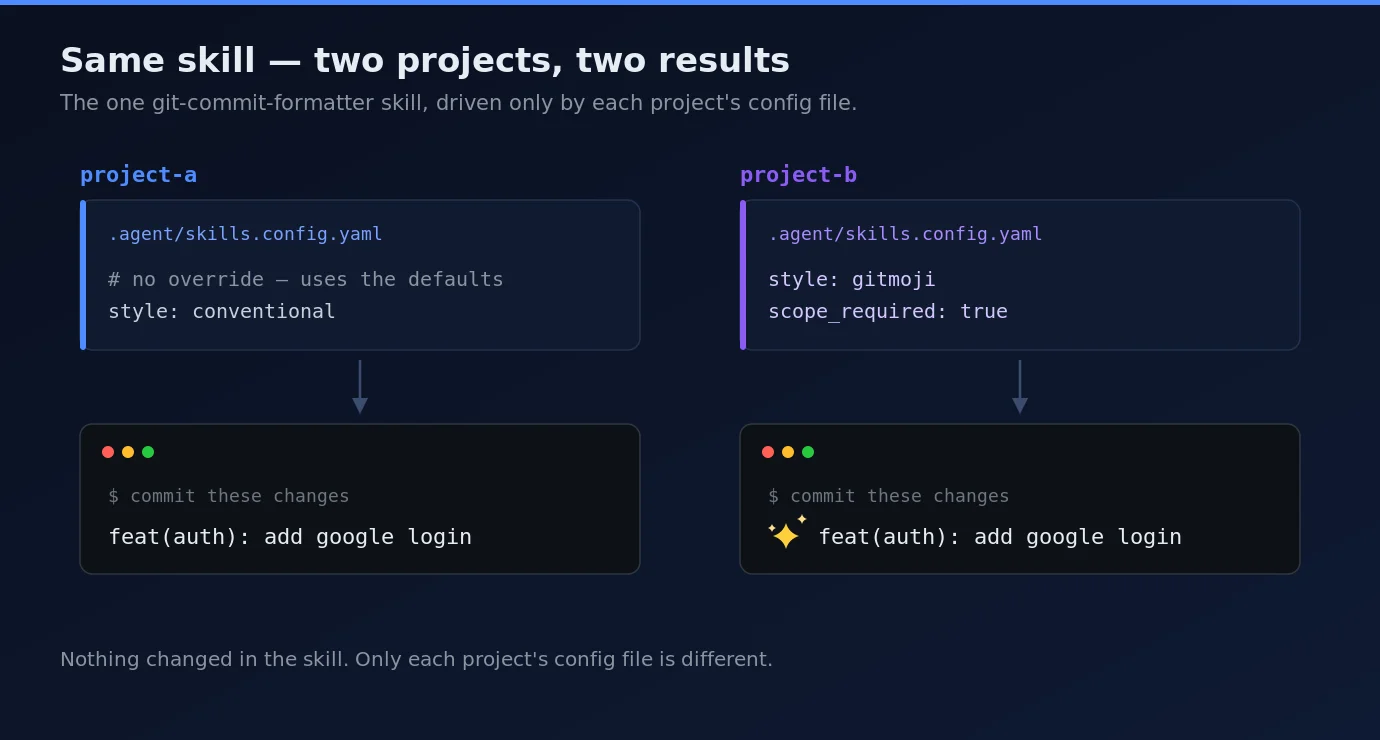
For instance, if you want to have gitmoji commits with additional types, simply create a single configuration file in your project:
# .agent/skills.config.yaml
git-commit-formatter:
style: gitmoji
extra_types: [ci, build]
scope_required: true
Now, you’ve modified three lines in your configuration without altering the skill or forking any code. Next time the agent commits, it will adopt these project-specific settings.
Conversely, a different project without any configuration file will default to the efficient Conventional Commits standards. This model allows you to maintain a single skill while enabling varied behaviors across different projects.
Testing Your Configurable Skill
Verification doesn’t require the agent to check the merge; you can run the loader independently and verify the output directly.
Without any overrides, you would receive defaults:
$ python scripts/resolve_config.py git-commit-formatter --project-root .
style: conventional
scope_required: false
...
Now, apply the project-specific override from the previous section and run it once more:
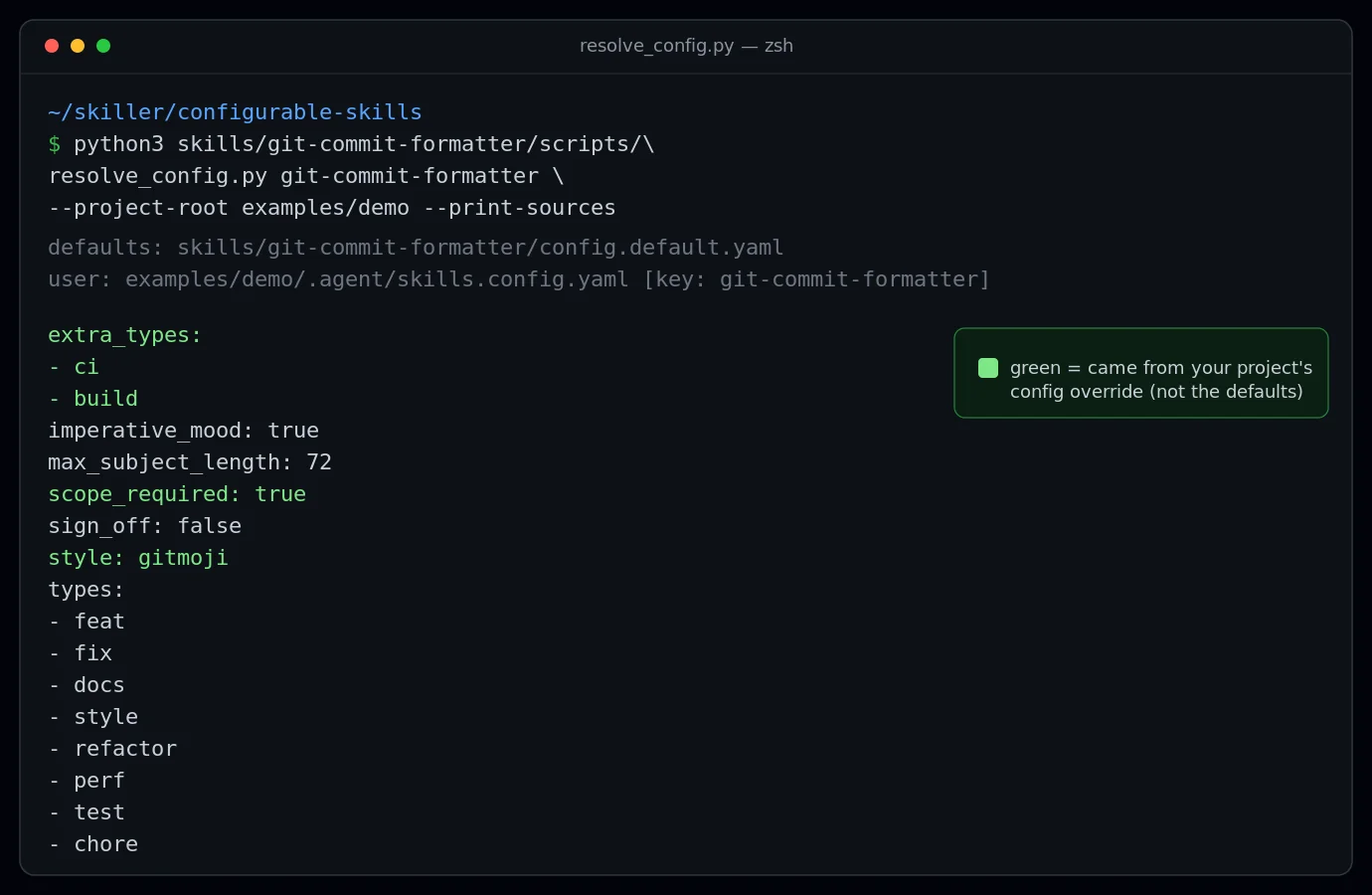
$ python scripts/resolve_config.py git-commit-formatter --project-root . --print-sources
style: gitmoji
scope_required: true
extra_types:
- ci
- build
types:
- feat
- fix
- docs
...
Here, the style has switched to gitmoji, scope_required is now true, and the additional types have emerged while preserving the base types list. This confirms the merge functions as intended.
Implementing a small automated test is advisable too, safeguarding against silent breakages in the future. This test can create a mock skill alongside a temporary project configuration, run the loader, and assert success in overriding user values while ensuring the default settings remain unaffected.
Additional Example Skills
The same configurable pattern applies across various skills. Here are two other instances to illustrate the versatility:
A Changelog Generator
The config.default.yaml for this skill exposes output formatting options (for example, Keep a Changelog), specifies which commit types to include, and determines whether commit hashes should be linked to the repository URL. One project might generate a formal changelog grouped by type, while another simply lists items. Same skill, different configuration.
# changelog-generator config.default.yaml (excerpt)
format: keepachangelog # keepachangelog | conventional | simple
include_types: [feat, fix, perf]
include_authors: false
repo_url: "" # if set, hashes create links to commits
A License Header Adder
This skill's configuration facilitates setting the license (like Apache-2.0 or MIT) and the holder, in addition to mapping file extensions to appropriate comment styles. A company can establish a holder in their project configuration, ensuring that new files receive the correct headers, without needing to edit the underlying skill.
# license-header-adder config.default.yaml (excerpt)
license: apache-2.0 # apache-2.0 | mit | custom
holder: "Your Name or Organization"
year: auto # auto = current year
The takeaway is straightforward: most skills house decisions that can be extracted into config.default.yaml, transforming a one-time utility into a versatile tool that others can adapt and reuse.
Sharing Your Agent Skills
When your agent skills conform to this convention, they can combine to form larger functionalities. To facilitate others in adopting your agent skills, adhere to these guidelines:
Ensure each skill is self-contained: Include a copy of
resolve_config.pyinside the skill'sscripts/folder, allowing anyone to copy a skill folder anywhere with a certainty that it will function correctly.Thoroughly document each configuration key in the
SKILL.md, providing users clarity on what they can adjust.Publish a simple index: An index.json that lists each skill's name, path, and available config keys will greatly enhance discoverability and contribution.
This convention—reading a config file first—is simple yet powerful, enabling anyone to develop compatible skills. Each new configurable skill enriches the ecosystem. By shipping your skill, you simultaneously promote a small standard on which others can build.
Final Thoughts
You started with a static skill bound to specific instructions, and turned it into a customizable tool that users can adjust via a single project file.
The entire setup is succinct: a merge function, the convention itself, and a config.default.yaml for each skill.
This shift also redefines how skills are shared. Instead of modifying a skill for a minor change, you can retain the shared logic while adjusting your configuration. Upgrades to the skill benefit everyone, and users still enjoy the desired functionality.
For those ready to test this out, construct the git-commit-formatter skill following this tutorial, place it in your Antigravity skills folder, and accompany it with a .agent/skills.config.yaml for a project. Change the style from conventional to gitmoji to observe the skill's adaptive behavior.
Finally, devise a configurable skill of your own. Assess the settings embedded in the instructions, transfer those into a config.default.yaml, and enable users to customize as needed.
The complete example code is available on GitHub at github.com/keepdeploying/configurable-agent-skills.
Thank you for reading. Should you create a configurable skill of your own, feel free to share. Let’s continue to foster this vibrant ecosystem.